Tutorial
Ten chapters covering every screen, every field and every action in WPE x64. Chapters 1–9 read as one path from install to advanced use; chapter 10 is a reference you come back to. You can also jump straight to whatever you are trying to solve.
All ten chapters are available in English, as is the FAQ. Terminology follows the software's own English UI, so every name below matches what you see in WPE.
Contents
Install and launch, the three entry points on the home screen, multi-instance databases, and the core concepts used throughout. Start here on your first run.
- Requirements · single-file launcher · upgrading
- Instance Settings: a different database is a different config set
- Choosing a mode · how packets reach the list
- Four filtering stages · Leach Settings ≠ Filters · System Socket
Inject the hook into the target process and tap the WinSock send / receive functions from inside — the view closest to the program's own logic.
- Picking a target: Pick a Process / Pick Window / Pick a File (started suspended)
- Hook Settings · Leach Settings · List Settings
- Search Packet (regex) · editing and replaying
- The full right-click menu · injection troubleshooting
WPE becomes a SOCKS5 proxy, with built-in mihomo routing selected local processes in and HTTP/HTTPS/TCP mapping.
- Proxy Settings · Export certificate · system proxy
- Process Settings (built-in mihomo / TUN)
- UnPack · upstream chaining · Map Local / Map Remote
- FireWall lists · proxy accounts · bringing in phones and other PCs with WPC
The heart of the software: match a packet and rewrite it before it is really sent or received.
- Which tool should do the editing · Normal vs Advanced
- Nibble wildcards · Exclude / Progression / Random
- Five actions · chained execution · execution order
- Five worked examples · why it is not matching
From reading a packet's structure to pinning down the one byte you need. Earlier chapters explain the software; this one explains how to approach an unknown protocol.
- Anatomy of a packet · locating a field in four steps
- Spotting counters, timestamps and checksums
- Detecting encryption · the full edit workflow
- Protocol signatures · legacy-tutorial terminology
The automation trio. They can call each other, and filters or hotkeys can trigger them.
- Which of the three you actually need
- Send List: batch replay with repeat count and interval
- Robot: packet / control / keyboard / mouse instructions
- WareHouse and Auto Stores: archiving samples by packet head
Everything outside the main window: five helper tools, WPC Config for the accelerator, five groups of global settings and the remote management web console.
- Statistical Data · Text Comparison · Encode/decode workbench · Decoders · Smart Decode · Extraction
- WPC Config: servers / rules / notices
- System Log · System Settings · HotKey Settings · BackUp Settings
- Preferences (language / appearance / display / file icons) · Remote MGT · performance tuning
Introduced in 2.3 and retained in 2.4: hand WPE's existing features to an AI client on this machine, replacing menu clicks with conversation.
- MCP Settings on the home screen: master switch and confirmation
- The status lamp and the MCP log
- Connecting an AI client (fixed path, no config change on upgrade)
- What it can read and write — and the two things it will not do
All 147 tools, grouped by purpose — the page to open when you need to know which tool to ask for.
- Proxy · Inject · Packets · Proxy Accounts · Filters · Send · Robots · Warehouse · Decoders · Extractors · Settings · Other
- Every tool: name · description (its own wording)
- Jump by purpose, or Ctrl+F straight to a name
Four look-it-up-and-leave tables. Not meant to be read through — come back when something does not add up.
- A · file types: what the 16 kinds —
.sb .fp .sp .rp .whpand the rest — are - B · packet types: 23 types ↔ the filter's 12 switches
- C · folders and dependencies
- D · glossary: one name per concept, site-wide
Find it by what you are trying to do
| Your goal | Where to start |
|---|---|
| First time — capture something quickly | Getting Started · quick start → Inject Mode |
| Unsure which mode to use | Getting Started · choosing a mode |
| Edit packets, manually or automatically | Filters (the core feature) |
| Replay packets or send them in a loop | Send List + packet editing |
| No idea where to start on an unknown protocol | Packet Analysis (locating a field in four steps) |
| Following an old tutorial that does not match | Legacy WPE terminology |
| Build an automation script | Robot |
| Let an AI drive WPE for me | Local AI automation (MCP) — leave MCP Settings on, then connect your AI client |
| See HTTPS in the clear | Proxy Settings + Export certificate |
| Capture from a phone, emulator or another machine | Proxy · bringing in devices with WPC (with certificate steps for HTTPS in the clear) |
| Not sure whether to use a Filter or Map Settings | Filters · which tool should do the editing |
| Run WPE as a proxy server for others | Proxy accounts + Remote MGT |
| Use it with the WPEProxyCap accelerator | WPC Config + WPC tutorial |
| Stutter under load / buffer climbing | Performance tuning |
| Something is broken | System Log + FAQ |
Reading conventions
[ Button ]marks a button in the UI; a small key cap like Start is also a button or a key- "right-click menu" means the menu that appears when you right-click the list or grid in question
- Hex input boxes take hexadecimal with spaces between bytes unless stated otherwise, e.g.
01 00 0A FF - The screenshots in each chapter all come from the dark interface; the numbered list beneath each one walks through its parts
Legacy tutorial (1.0.0.36)
1.0.0.36 had a completely different interface — a single WinForms window plus a separate process injector — which does not map onto the Vue 3 + WebView2 interface of 2.5. That tutorial is no longer maintained as web pages; only the PDF is archived, in Chinese:
What follows is the order you actually do things in: install → enter a subscription ID → connect → read the Control Center → know where to look when something breaks. Every screenshot is from the dark interface.
01 · Installing and first run
| Item | Requirement |
|---|---|
| System | Windows 10 / 11, 64-bit |
| Privileges | Must run as administrator — the acceleration core creates a virtual adapter (TUN) to take over traffic, which is a system-level operation. The program asks for elevation itself; answer Yes to the UAC prompt |
| Distribution | WPC v1.2.zip (Lanzou / Baidu Pan, 92.38 MB; see Downloads), which unzips to the single-file launcher WPC v1.2.exe (with a checksum file WPC v1.2.exe.sha256.txt — see the download center for how to check it): on first run (or after a version change) it shows a progress window while unpacking into %LOCALAPPDATA%\WPEProxyCap\app\<version>-<hash>\; every later launch verifies and repairs the files and removes old version folders that are not in use. No installer |
| Runtime | Nothing else to install: the .NET runtime and the interface are bundled into the program, and the acceleration core ships with it. The interface runs on Microsoft Edge WebView2, which Windows 11 ships with and Windows 10 normally has via Edge; if it is missing the program offers to help you install it |
| Antivirus / firewall | Creating a virtual adapter and changing routes is the sort of thing that gets blocked. If a firewall prompt appears on first run, allow all of it |
| Where settings live | %LocalAppData%\WPEProxyCap\config.json — the subscription ID, the last account used and the interface preferences. Deleting it after uninstalling is what makes the cleanup complete |
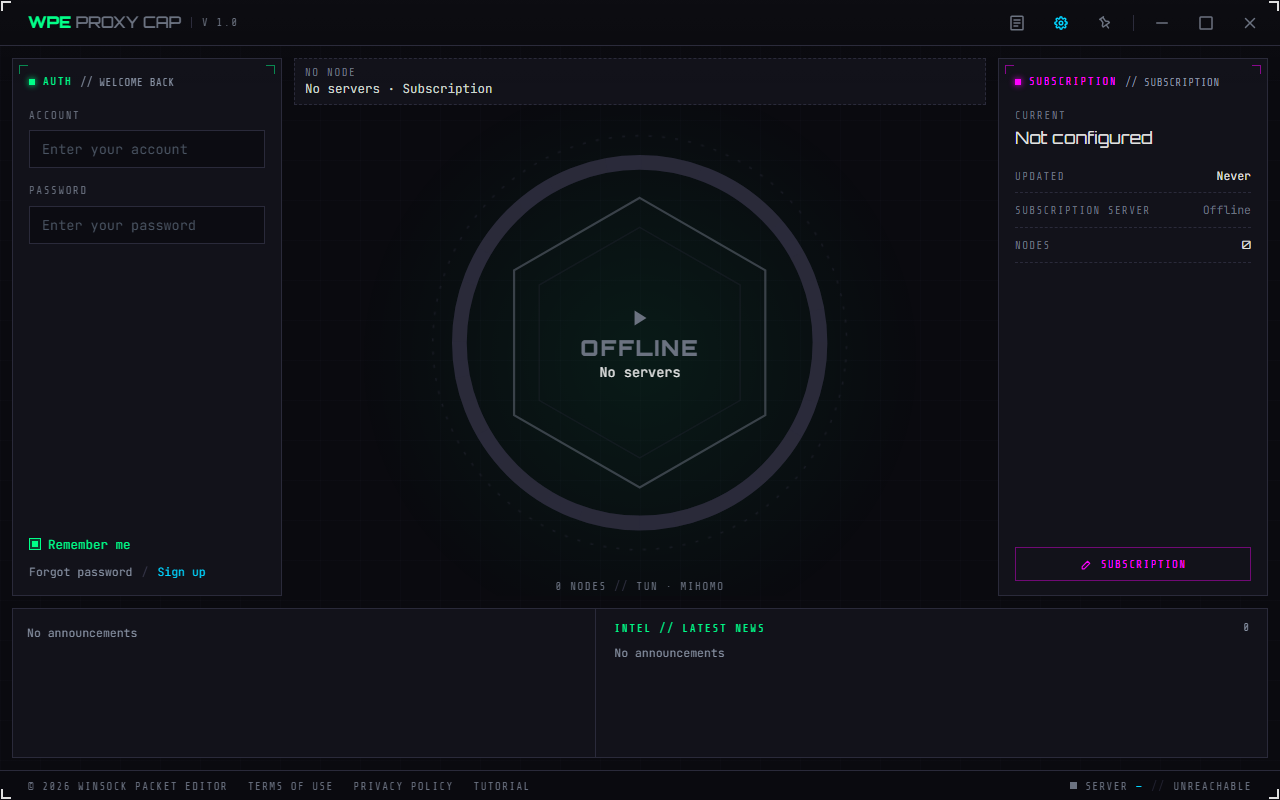
- Title bar (left to right): brand and version · System Log · Preferences (gear) · Always on top (pin) · Minimize / Maximize (Restore) / Exit
- Left, the AUTH bay: account and password, Remember me, Forgot password / Sign up
- Centre: the node tiles and the reactor core — the core is the connect button. The node area is empty until you subscribe
- Right, the SUBSCRIPTION bay: subscription ID · last updated · subscription server status · node count (0 right now). The Subscription button at its bottom is where you enter an ID — that is where you start the first time
- Bottom, the INTEL band: the notice list and the detail of the selected one. Empty until you subscribe
- Status bar: © 2026 Winsock Packet Editor · terms of use · privacy policy · tutorial, with the current server (its subscription ID) and the latency to that server on the right
- ⚠️ The nodes, the SUBSCRIPTION bay and the notices all come from the subscription, so being empty before you enter an ID is correct, not a fault
When it connects to a proxy server the client sends that server its device identifier, operating system version and client version. The device identifier is a SHA-256 hash computed from this PC's installation ID, system drive volume serial number and motherboard serial number — it contains no raw serial numbers and is never written to the local configuration file. It is what limits how many devices one account may use at the same time, so if the same account is connected on another PC or phone, this side may report the device limit has been reached. The full text is in the program's privacy policy (linked from the status bar).
02 · Entering a subscription ID
Click the Subscription button at the bottom of the SUBSCRIPTION bay on the right.
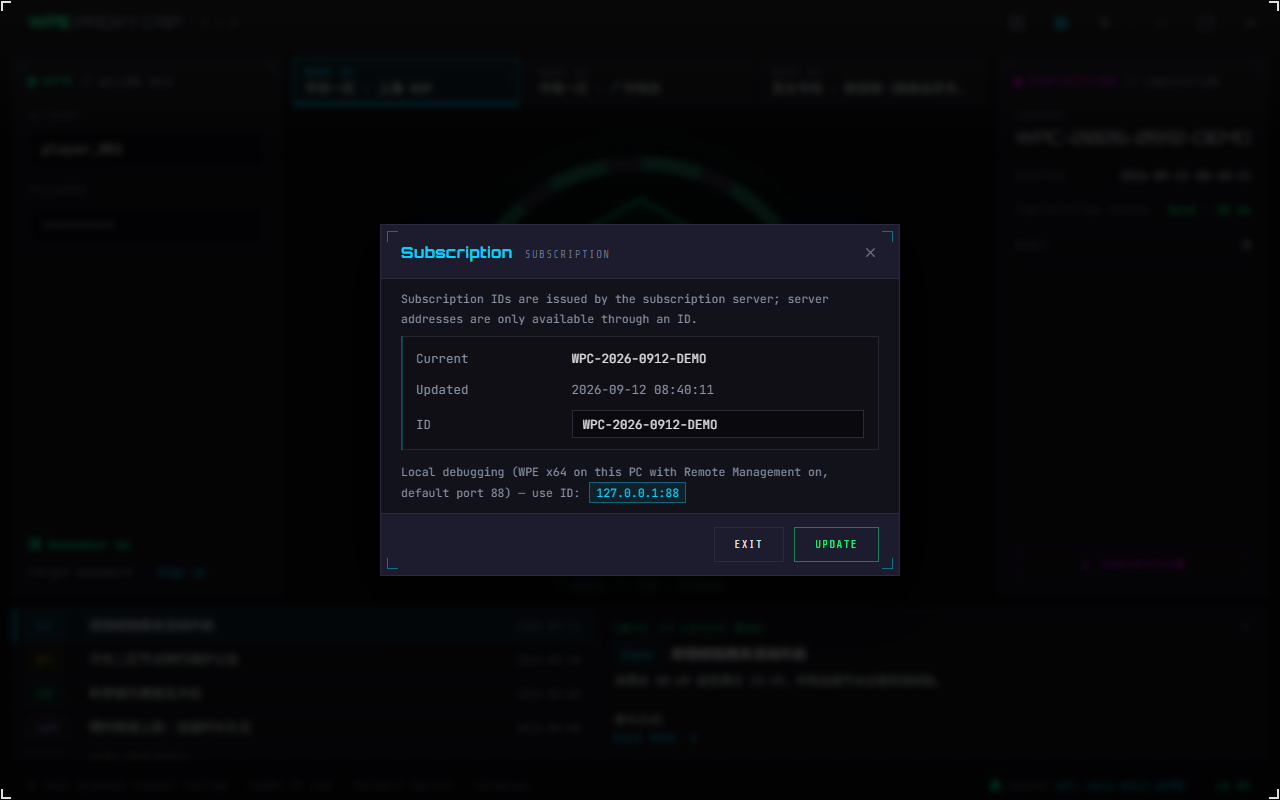
- The note on top: only the subscription server can issue an ID, the client cannot create one; and server addresses are only available through an ID — the client has no field for typing one in, so without an ID the node list stays empty
- Current / Updated: the ID and timestamp of the last successful fetch, read-only
- ID: the subscription ID the subscription server issued you; press Enter or Update
- Update: the client exchanges that ID for a proxy server address, then pulls the node list, forwarding rules and announcements from that WPE. On success the node tiles, the INTEL notices and the SUBSCRIPTION bay fill in immediately
- Local debugging: when WPE x64 runs on the same PC with Remote Management turned on (default port 88), you can use the shared debugging ID
127.0.0.1:88— clicking it fills the box; you still press Update yourself - The two common failures: cannot reach the subscription server (a network problem — check the subscription server status in the SUBSCRIPTION bay) · subscription ID not found or expired (see Where subscription IDs come from for how to request or renew one)
03 · Connecting
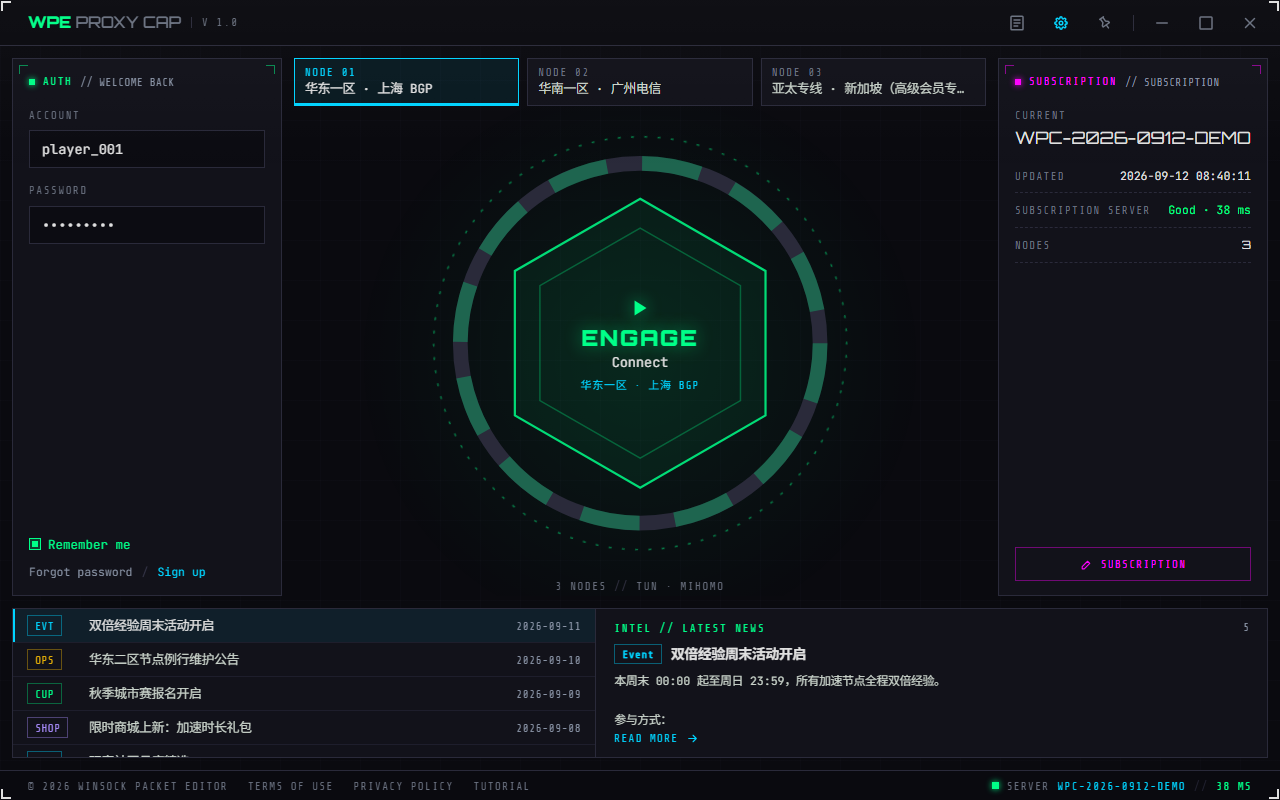
- Announcements come in five categories, each with its own colour tag: Event · Maintenance · Esports · Store · Community. Click one in the INTEL band at the bottom to see its detail, and "Read more" opens the link it carries
- ⚠️ Announcements have two sources: global ones from the subscription server (the same for everyone) and per-server ones from the WPC Config → notice list of the WPE you connect to
- Node tiles: the nodes the subscription returned; click one to select it
- Account / Password (the AUTH bay on the left): the credentials of a proxy account, issued from the account list on the WPE x64 side — not the subscription ID; the two are different things
- Remember me: saves you retyping next time. ⚠️ It is kept in
config.jsonon this machine, so do not tick it on a shared computer - Forgot password / Sign up: open the two URLs that come with the node (filled in per node in WPE's WPC Config). If there are no nodes yet, the node has no such link, or the system cannot open the link, you get a message telling you which — they never do nothing
- The reactor core: clicking it connects — generates the mihomo configuration → starts the acceleration core → brings up the TUN adapter that takes over the traffic
- ⚠️ Once connected, the same layout becomes the Control Center (next section)
① Does the subscription server status in the SUBSCRIPTION bay say Offline? That is the subscription hop, and has nothing to do with your account.
② For the node you picked, is the proxy service on the WPE side actually running (its status bar should read "Running")?
③ The credentials are a WPE proxy account, and that account has to be enabled, unexpired, and within its connection and device limits (the same account connected on another PC or phone also counts against the device limit).
When it will not connect, read the System Log first (the leftmost button in the title bar): it says which step it stopped at and what the server answered. The security check lives in the Control Center, i.e. after you are connected — you cannot open it while you are not.
04 · The Control Center
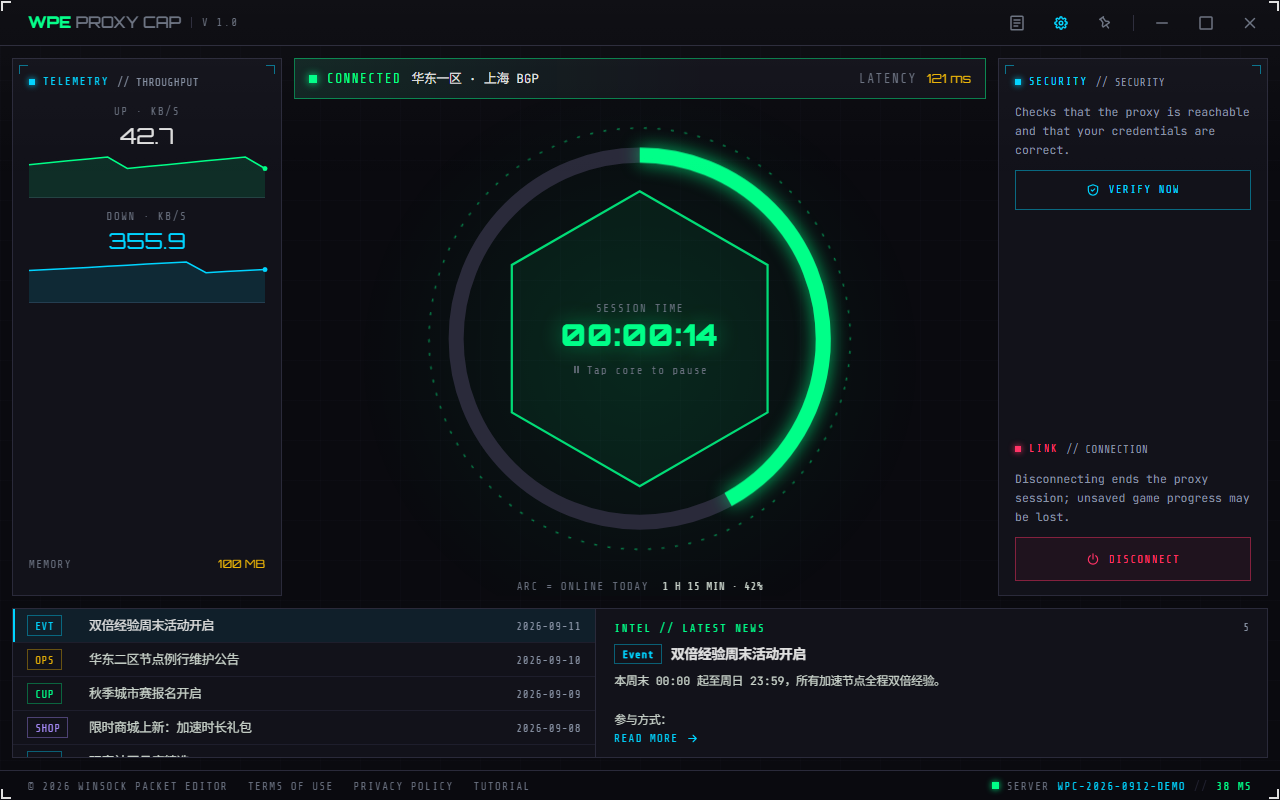
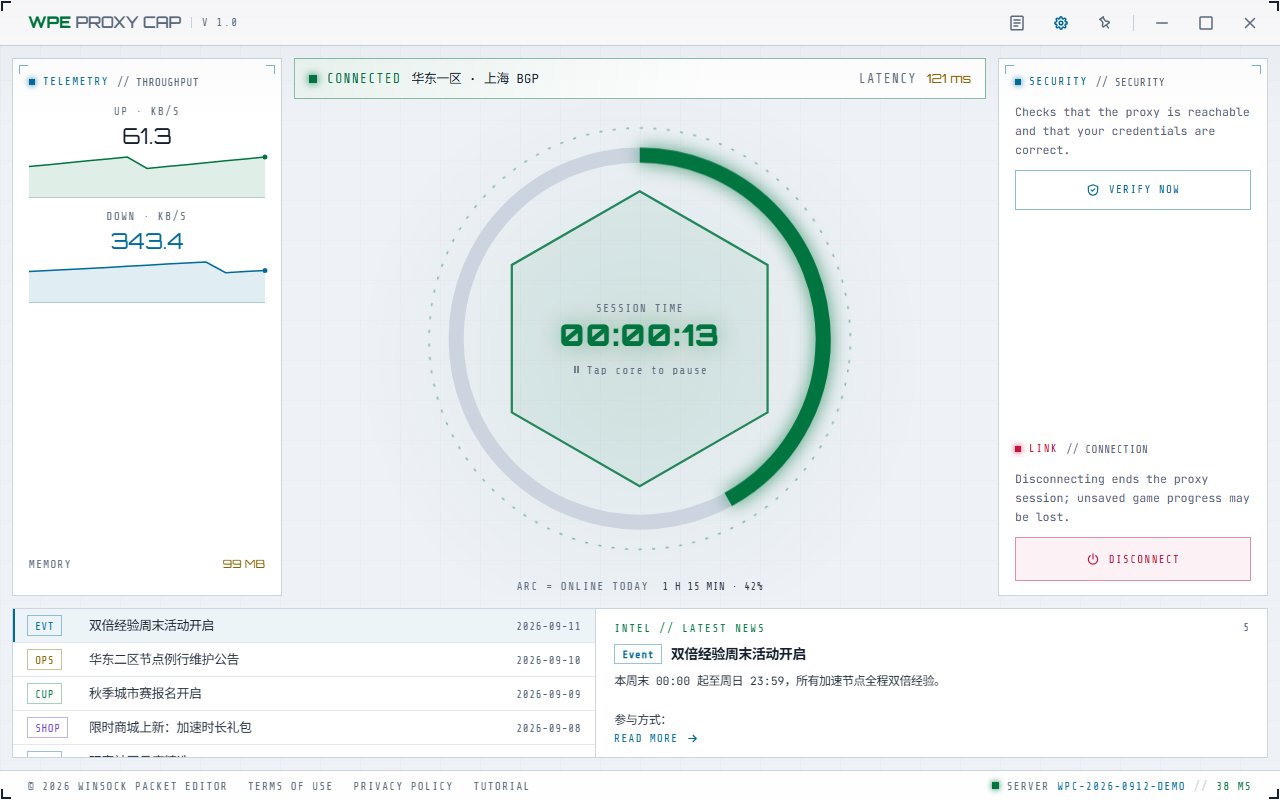
- Telemetry bay (left): upload and download speed sparklines · memory. Throughput and memory come live from the acceleration core, they are not estimates; latency is shown on the centre plate next to Connected
- The timer core: this session's online time; it can pause and resume — the timer only; the proxy is unaffected
- The ring around the core shows Online today as progress; the line below the core gives today's online time and the percentage (the ring is measured against three hours, and reads 100% once you pass that)
- Action bay (right): Disconnect, behind a confirmation (disconnecting ends the proxy session and unsaved game progress may be lost)
- In the same bay: Verify now, see the next section
- ⚠️ Closing the window disconnects: there is no background mode — closing the window stops the acceleration core. If the core crashes, or the link to the server drops (network lost, or the same device signs in elsewhere), the client likewise marks itself disconnected
05 · The security check
It answers a very specific question: is the server reachable, are the credentials right, and can this device take a slot. It lives in the SECURITY panel on the right of the Control Center — that is, only once you are connected. While you cannot connect you cannot open it; read the System Log instead.
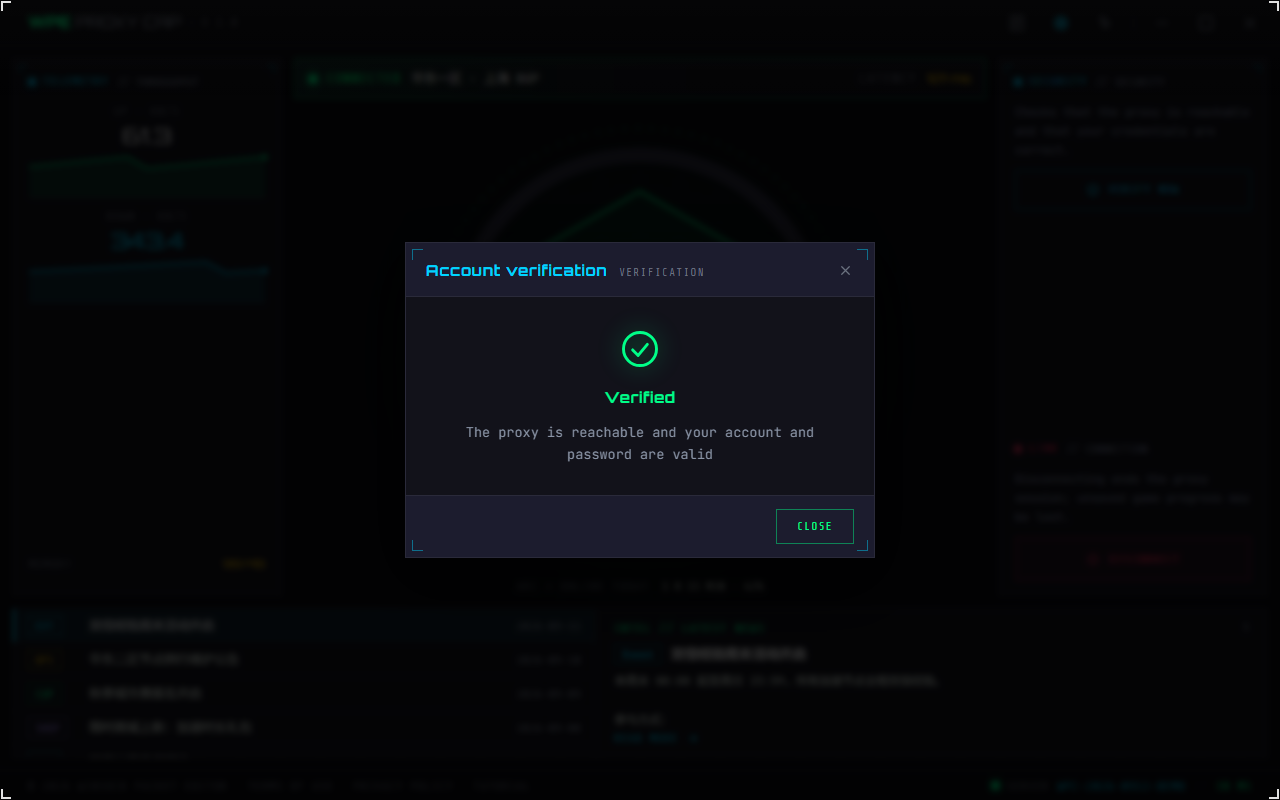
- It starts with "Verifying…", stepping through Checking the server response… → Checking the proxy connection… → Checking your account and password… (on a newer WPE there is one more: Checking your account, password and device…)
- On a newer WPE this step is a device registration: this PC is registered as one online device, and the registration is dropped as soon as the check ends. That is why it can tell wrong credentials / expired account / disabled account / device limit reached apart in one go. On an older WPE, or when the server has account authentication switched off, it does a SOCKS5 handshake and authentication instead
- Verified: the proxy is working and the credentials are valid (on a newer WPE it also says the device is registered)
- Verification failed: read the reason in the result — a connection timeout, SOCKS5 not supported or communication with the server failed is on the server side (check whether the service on the WPE side is running and whether its firewall has blocked your IP); a wrong account or password, an expired account, a disabled account or a device limit reached is on the account side; account authentication is off means the server is fine, it simply does not check accounts
- ⚠️ If you are already connected and the link to the server is healthy, it reports "This device is registered, the connection to the server is healthy" straight away — it does not register a second time (that would kick the connection you are using)
- ⚠️ This path carries no traffic, it only probes; the real traffic is sent by the acceleration core. So "verified but the game still is not going through the proxy" is a different problem — go to the System Log
06 · The System Log
The first button in the title bar, at the far left. The first place to look for anything.
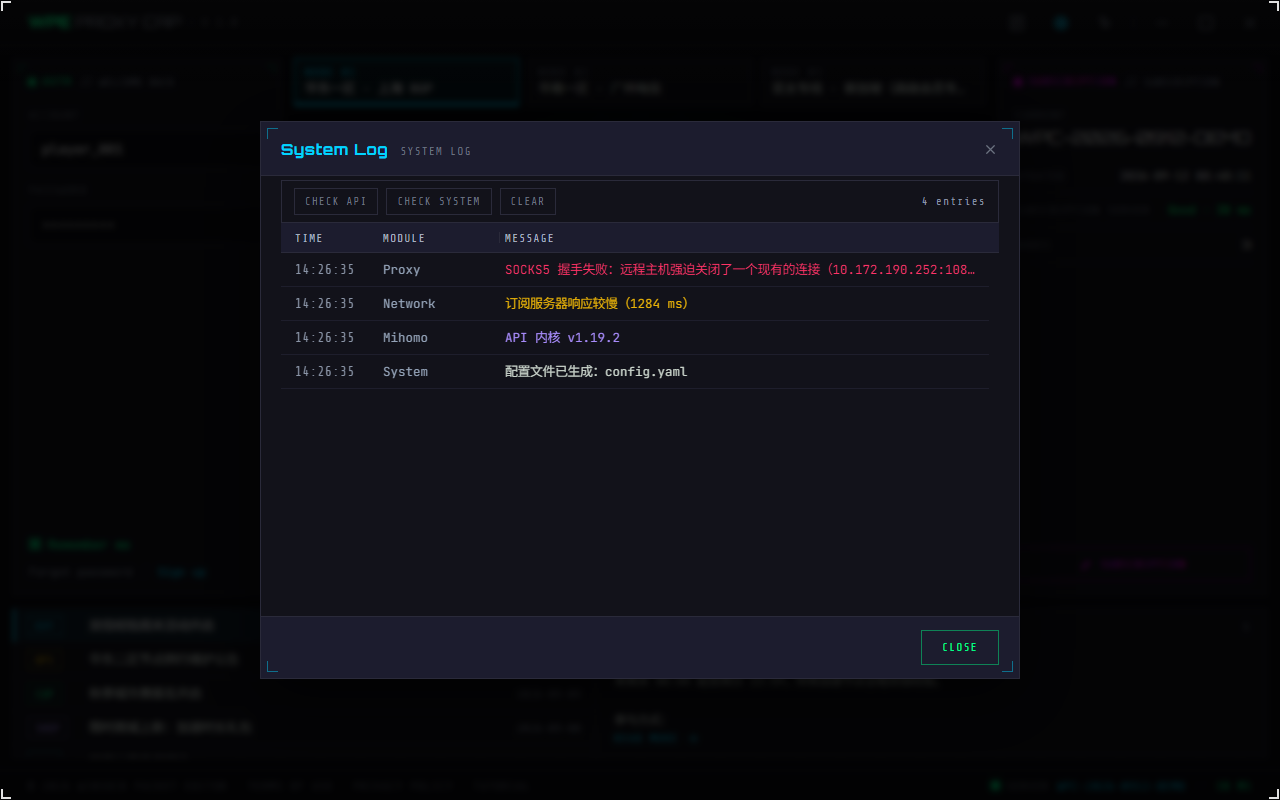
- Columns: time · module · message. The modules you will usually see are
System(the client itself) ·Mihomo(the acceleration core) ·WpcControlClient(the sign-in link to WPE), plus a set of modules named after what they do (subscription, node list, live monitoring, configuration building). Only the Module column can be dragged wider; double-click to reset it - Colours follow the level: red is an error, amber a warning, violet debug output and grey an ordinary entry. Log messages are recorded in Chinese whatever the interface language, and only the most recent 200 lines are kept
- Check API: probes the acceleration core on the spot and writes the result as a log line
- Check system: writes one line with this PC's Windows version
- Clear: empties the table
- ⚠️ A line reading
已成功登录 -followed by the node name ("signed in") means the acceleration core has started; if connecting fails, the red and amber lines before that point say where it stopped - ⚠️ An amber line reading
已跳过一条规则:类型,参数(原因)means the node sent a rule the acceleration core does not understand and the client skipped it — the connection is unaffected, but that one rule does nothing. See Troubleshooting
07 · Preferences: language and appearance
The gear in the title bar. The same design as WPE x64: seven languages, three themes, and a scan line you can turn off.
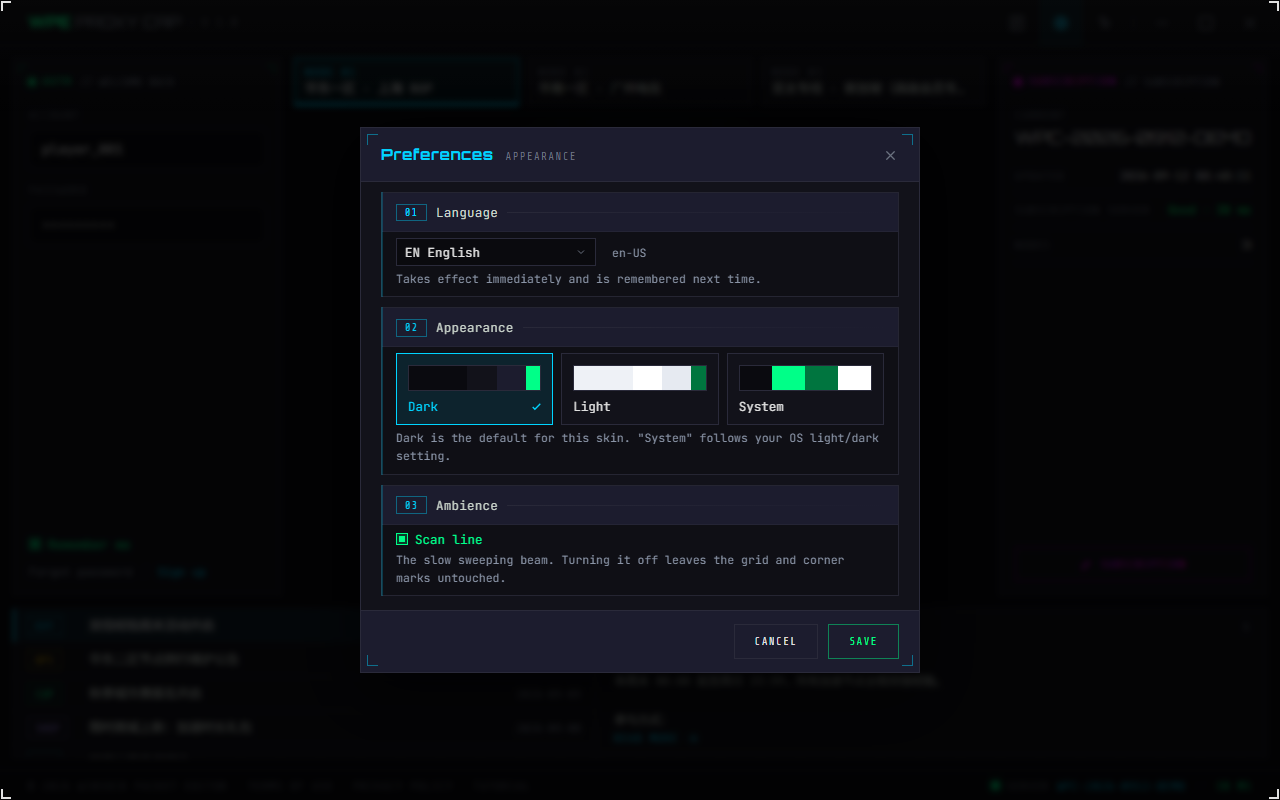
- Language: seven — Simplified Chinese · Traditional Chinese · English · Japanese · Korean · Vietnamese · Russian, listed in the dropdown by language code. Each row is a two-letter prefix plus the language's own name for itself, with the culture name (
zh-CN) beside it — once you have switched into a language you cannot read, the endonym is the only thing on screen you still recognise - Appearance: Dark / Light / System, each card with a four-colour preview strip. Not an inversion — the same layout with a different palette
- Ambience · scan line: the beam that sweeps slowly across the screen. Turning it off leaves the grid backdrop and the corner marks untouched
- This screen is a draft: your choices only apply when you press Save, and are then remembered for next time
- ⚠️ The theme does not affect acceleration; it is only the interface palette
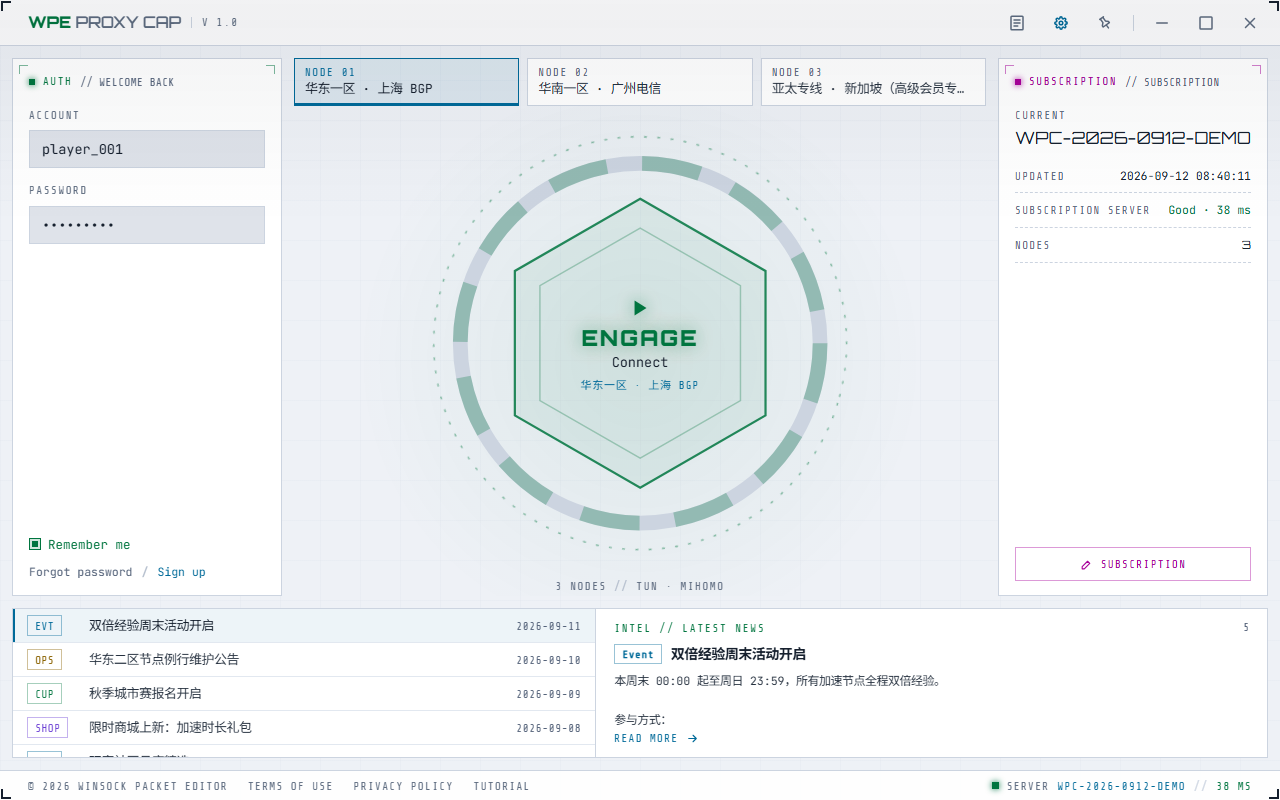
- Under "System" it follows the Windows light/dark setting, without restarting the program
08 · Troubleshooting
| Symptom | What to check first |
|---|---|
| Double-clicking does nothing, or it flashes and disappears | ① The UAC prompt was declined — run WPC v1.2.exe again and choose Yes; on the first run, wait for the unpacking to finish. ② It says Microsoft Edge WebView2 is missing — install it as prompted and reopen; Windows 11 ships with it and Windows 10 normally has it via Edge. ③ If antivirus removed it, look in the quarantine |
| Announcements and servers are both empty | No subscription ID, or it has expired — see section 02 |
| The SUBSCRIPTION bay says the subscription server is Offline | The hop from this machine to the subscription server is down — unrelated to your WPE. Check the local network and DNS first. The millisecond figure shown beside it is the latency to your own WPE, not to the subscription server |
| There are node tiles, but connecting always fails | Read the System Log first (leftmost button in the title bar): it says which step it stopped at and what the server answered. The security check lives in the Control Center after connecting, so it cannot be opened while you are not connected. Among the reasons the log gives: a connection timeout, SOCKS5 not supported or a communication failure points at the server; wrong account or password, an expired account, a disabled account or a device limit points at the account |
| It says this account has reached its device limit | The same account connected on another PC or phone takes a slot too — disconnect that one first, or raise the device limit in WPE x64 under proxy accounts |
| Connected, but the game is not going through the proxy | ① Is that traffic being sent direct by a forwarding rule (rules live in WPE's WPC Config, one set per node)? ② Check the System Log: a line reading 已跳过一条规则:…(原因) means that rule was skipped because the core does not understand it. ③ Other details are in the Mihomo lines |
| High latency or poor throughput | Try another node; announcements often mention things like "nodes are under heavy load during the event" |
| Acceleration suddenly disconnected | Check the System Log: when the acceleration core exits unexpectedly, or the link to the server drops (network lost, or the same device signs in elsewhere), the client marks itself disconnected; click the reactor core to connect again. Core-side reasons are in the Mihomo lines |
WPC only gets the traffic to the proxy server. Capturing, editing, filters, accounts and the firewall all live at the WPE x64 Proxy Mode end — none of them show up in the client's log. The two entry points are the client's System Log and WPE's System Log.
WPC for Android 1.1 is WPC's Android client. Its four bottom tabs — Boost · Nodes · Inbox · Me — turn into a side rail on tablets and in landscape. Android's system VPN and in-process mihomo follow node rules to send applicable traffic to WPE. What follows is the order you actually do things in: install and grant permissions → enter a subscription ID and account → connect → choose which apps use the proxy → keep the connection alive in the background → read the status once connected and change settings under Me → know where to look when something breaks. Most screenshots remain from the 1.0 dark interface; the per-app proxy screenshot and feature guidance reflect 1.1.
01 · Installing and permissions
| Item | Requirement |
|---|---|
| System | Android 8.0 or later |
| Architecture | ARM 64-bit (arm64) |
| WebView | The interface runs on Android System WebView, version 90 or later |
| Distribution | Download the 1.1 ARM64 APK from Downloads (Lanzou / Baidu Pan, 29.32 MB), then open it on the phone to install, allowing installing apps from unknown sources when asked. The app never checks online for new versions — install a newer APK over the existing app to upgrade |
| Root | Not required |
Once installed, the app appears on the home screen and in the app drawer as WPC. Each system permission is only requested when it is needed:
- VPN connection request: the Android version takes over traffic through Android's system VPN. On the first connection Android shows its VPN connection request — tap OK (Allow on some systems). If you refuse, it cannot connect and the app shows "VPN permission was not granted".
- Notifications: asked on Android 13 and later, and optional. If granted, a persistent notification shows the connection state while connected and has a Disconnect button.
- Background running: see section 05.
Update "Android System WebView" or "Chrome" from the app store, then reopen the app. Phones without Google services update WebView through their own app store.
02 · Subscription ID and account
The first time you open the app it only asks for the subscription ID. Subscription IDs are only issued by the subscription server, and server addresses are only available through an ID — see Where subscription IDs come from for how to request one. If an ID is already saved, or you are connected, this screen does not appear.
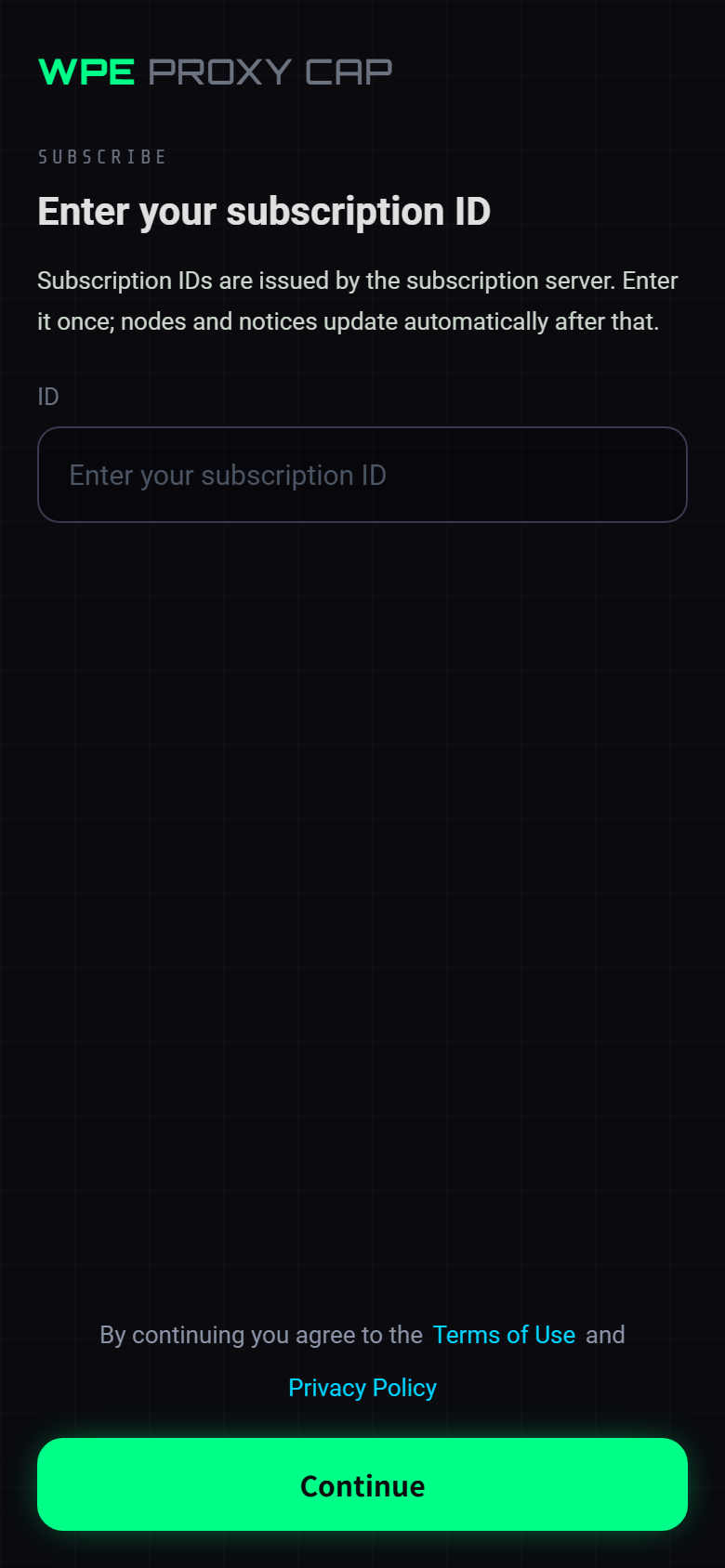
- ID: the subscription ID the subscription server issued you. The app exchanges it for a proxy server address, then pulls the nodes, forwarding rules and notices
- Continue: if the ID is not found or has expired, or the subscription server cannot be reached, the reason appears under the box
- At the bottom are the Terms of Use and Privacy Policy; continuing means you agree to them
After that you land on the Boost tab, where the Account and Password fields sit in the account card lower down the page (the card itself only shows two placeholders; open it to edit, and the two labels appear there). These are the credentials of a proxy account on the WPE x64 side, not the subscription ID, and they are stored only on this phone. Remember me is on by default and must stay on for Always-on VPN. No account yet, or forgot the password? Forgot password / Sign up at the bottom of the account card open the addresses that come with the selected node — and if there are no nodes yet, the node has no such link, or the system cannot open it, you get a message saying which. Tapping the reactor core before both fields are filled asks you to fill them in first. While there are no nodes the account card is hidden; tap Set up subscription and get the subscription ID right first.
To change your account later, tap the account card at the top of the Me tab; to change the subscription ID, tap the ID row at the top of the Nodes tab — that row only appears once there are nodes; before that the entry point is Set up subscription on the Boost tab.
03 · Connecting
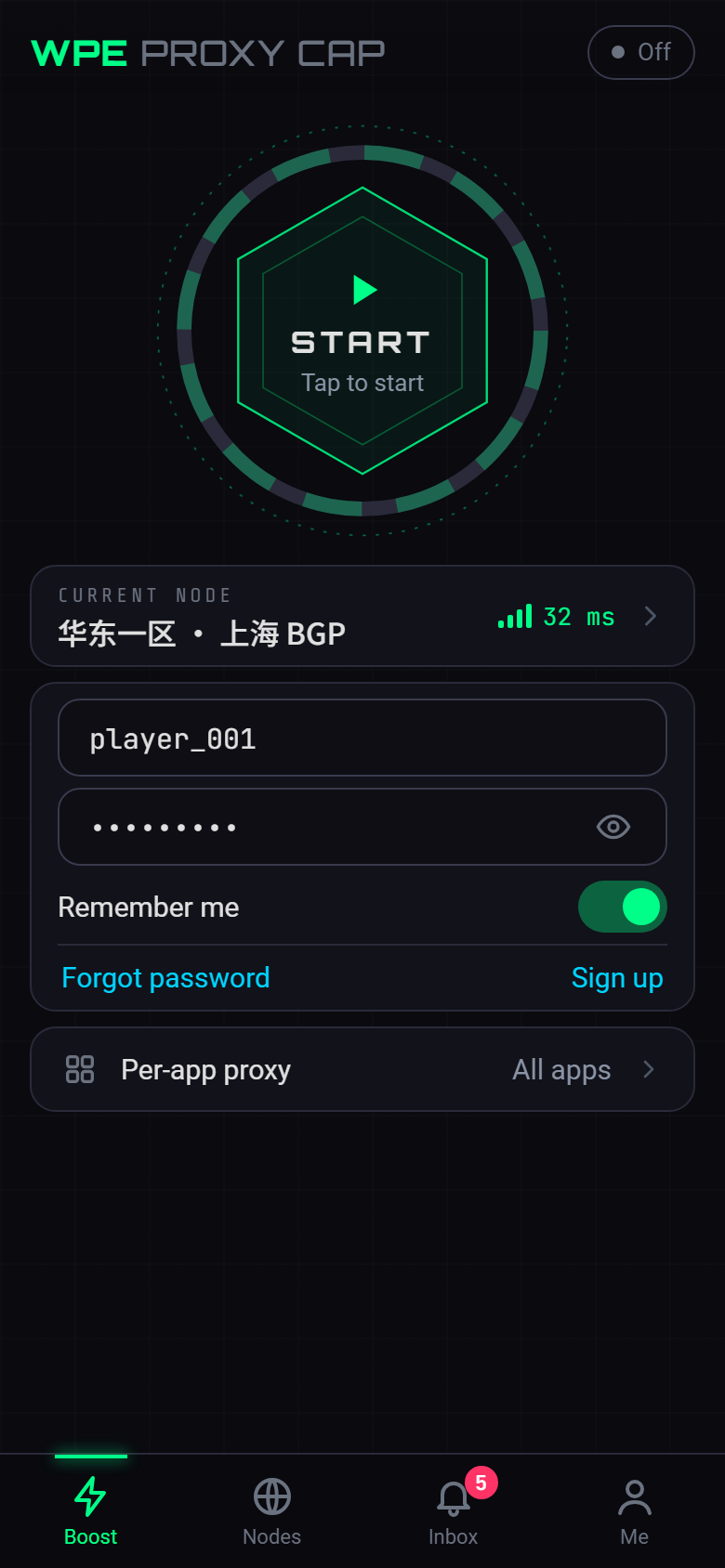
- Status at top right: Off / Connecting… / Boosting / Timer paused
- The reactor core: shows "START · Tap to start" — tapping it connects
- Current node: the node name and a latency signal; tap it to open the node list from the bottom
- Account card: account, password and Remember me, with Forgot password / Sign up at the bottom
- Per-app proxy: tap to change it right there
- Tab bar: Boost · Nodes · Inbox (with an unread count) · Me
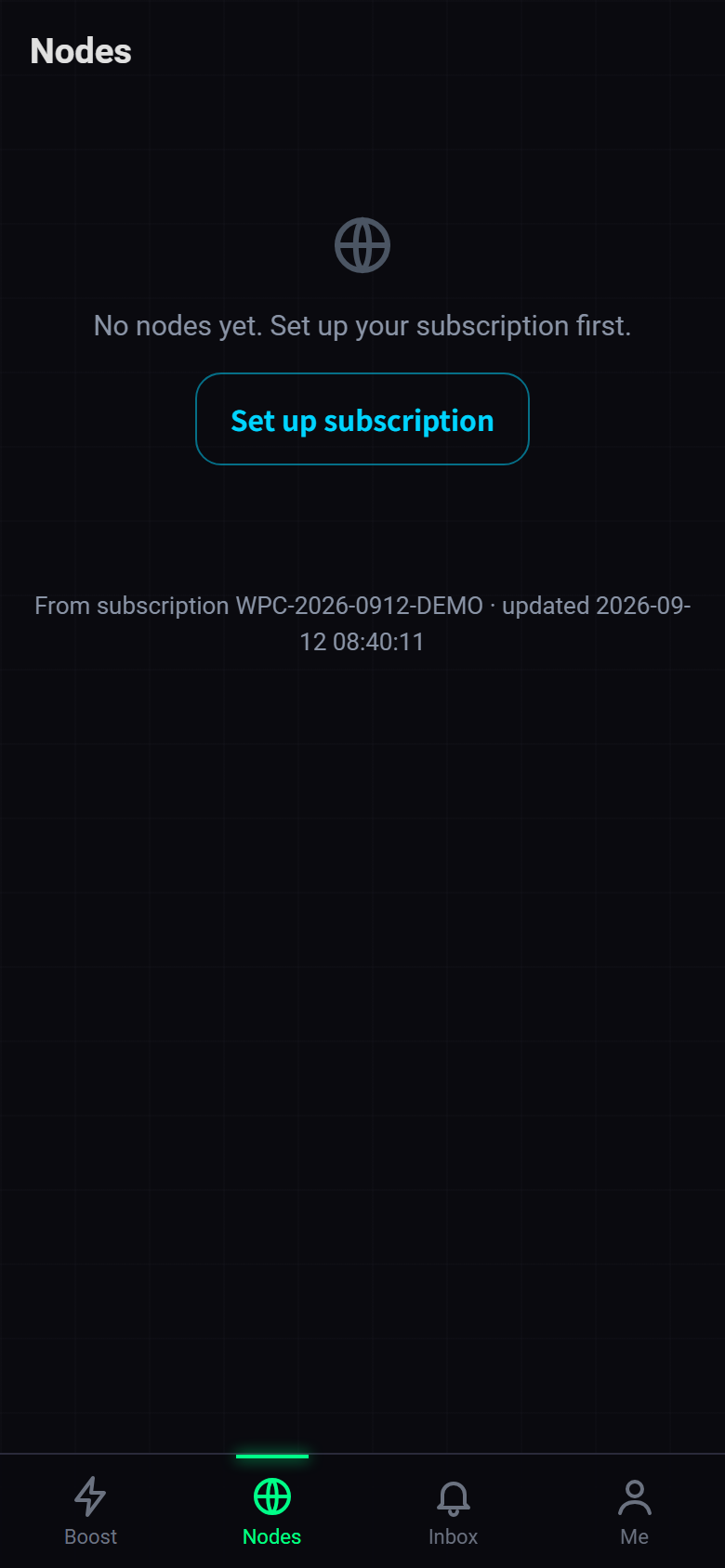
- ID: the current subscription ID; tap it to see the subscription details and change it (this row only appears once there are nodes)
- Node name: shown in full and wrapped when it is long; the selected node has a cyan edge and a tick. Each entry also carries a
NODE 01style number - Latency: signal bars and colour both show speed, in three states — a measured node shows milliseconds, one that has not been measured yet shows "—", and one that cannot be reached says Timeout. Unmeasured and timed-out nodes sort after the reachable ones
- No phone proxy rules: none of this node's rules sends traffic through the proxy on a phone — see section 07
- Test again: measures every node again; pull the page down to refresh the subscription. Above the list it says "N nodes · sorted by latency", below it "From subscription X · updated Y"
Once a node is selected, go back to the Boost tab and tap the reactor core to connect. On the first connection Android shows its VPN connection request first; the connection only comes up after you tap OK. You cannot switch nodes while connected — disconnect first.
The Boost, Nodes and Inbox tabs can all be pulled down to refresh. With no nodes yet, the Boost tab shows "No nodes yet. Set up your subscription first." — tap Set up subscription to enter your ID.
① "VPN permission was not granted": the VPN connection request was refused — connect again and tap OK on the system prompt;
② "Connection failed. Check your subscription, account and password.": open Me → System Log. If it says 该账号的设备数已达上限 (the account's device limit has been reached — log messages are recorded in Chinese), the phone and the PC count as separate devices, so with a limit of 1 and the PC already connected the phone cannot connect. Disconnect the PC first, or raise the device limit under proxy accounts in WPE x64;
③ Everything else — server status, whether the account is enabled or expired — is the same as on Windows; see WPC · Connecting.
04 · Per-app proxy
The Android version lets you choose which apps use the proxy. The app itself never goes through the proxy. Open Per-app proxy from the Boost tab — that entry point only appears while you are disconnected, so to change it while connected, disconnect first and connect again afterwards.
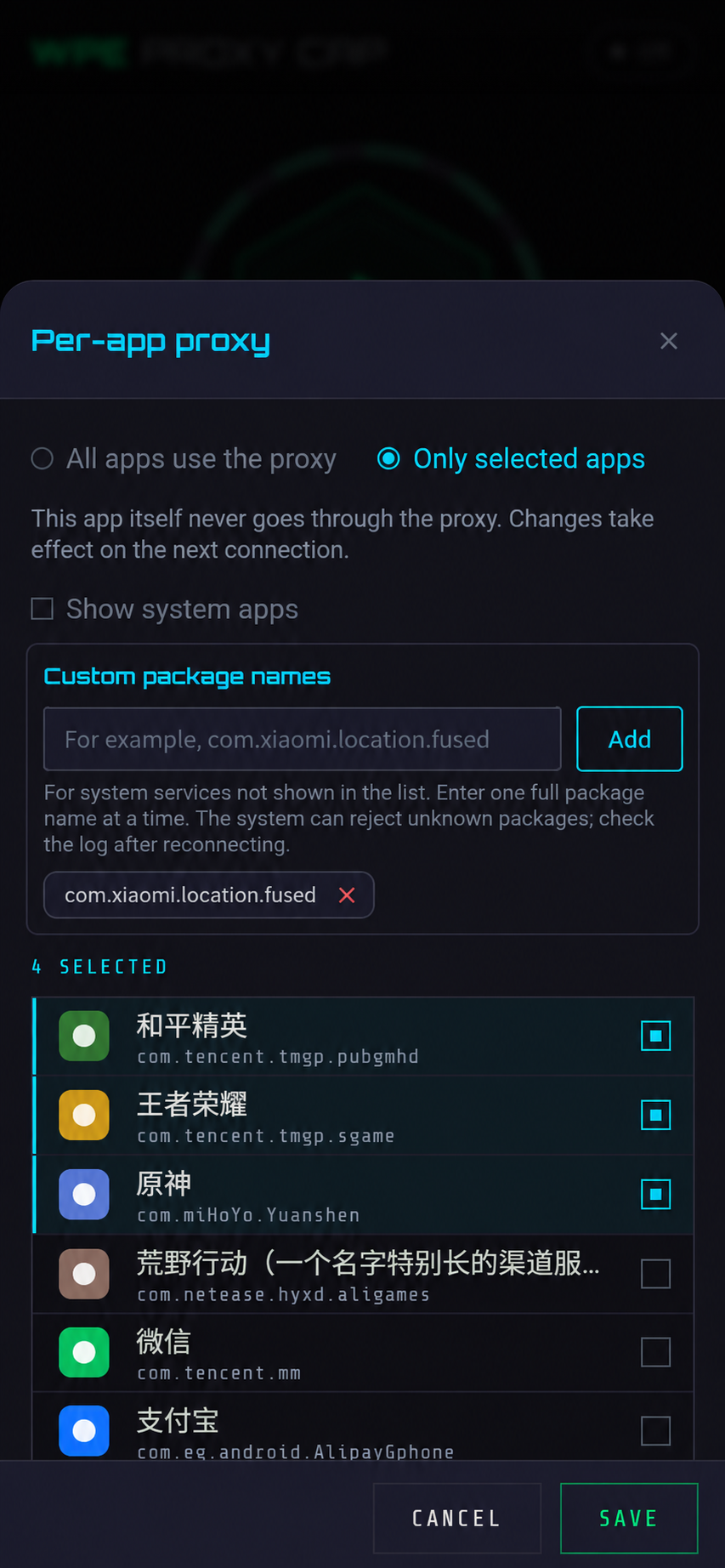
- Two modes: All apps use the proxy · Only selected apps
- The note: this app itself never goes through the proxy; changes take effect on the next connection — so while connected you have to disconnect before you can change anything
- The list: selected apps come first, the rest are sorted by name
- Show system apps: system apps stay hidden unless this is ticked
- Custom package names: for a system service or component with no launcher icon that is absent from the list, enter one complete package name at a time; if Android rejects an unknown package, reconnect and check the System Log
- N selected and the app list: each row shows the icon, app name and package name, and the checkbox on the right decides whether it uses the proxy; selected rows carry a cyan bar on the left
- Save / Cancel: in "Only selected apps" mode at least one app must be selected
PROCESS-NAME / PROCESS-PATH rules are skipped on phones, so use this to send a particular game through the proxy — see section 07.
05 · Background running and reconnection
Android restricts apps running in the background. To keep the connection stable after the screen locks or you switch to another app, set up the following:
- Allow background running: when a "Background running is restricted" banner appears at the top of the Boost tab, tap Allow and allow it in Android's battery-optimization prompt. The banner then goes away, and the background-running row on the Me tab is hidden as well.
- Vendor background permissions: some vendor systems also need the app allowed to auto-start / run in the background in their phone manager app.
- Notifications: with the notification permission granted, a persistent notification shows the connection state while connected, with a Disconnect button right there.
- The Back button: first closes an open panel or message; on another tab it returns to Boost; on the Boost tab it sends the app to the background and the connection keeps running. To disconnect, tap Disconnect on the Boost tab or in the notification.
- Always-on VPN: once the app is set as the Always-on VPN in Android's VPN settings, it connects in the background with the saved account and node. This requires Remember me to be on and an existing subscription.
- Automatic re-registration: if the link to the server drops (switching between Wi-Fi and mobile data, the phone briefly freezing the app), the app re-registers with the server automatically and keeps the connection; meanwhile the notification reads "Network changed, re-registering…". Nothing to do by hand.
- If the server rejects the account (wrong password, expired, disabled, device limit reached, account authentication not enabled on the server), or repeated retries fail, the app disconnects and records the reason in the System Log.
06 · After connecting, and the Me tab
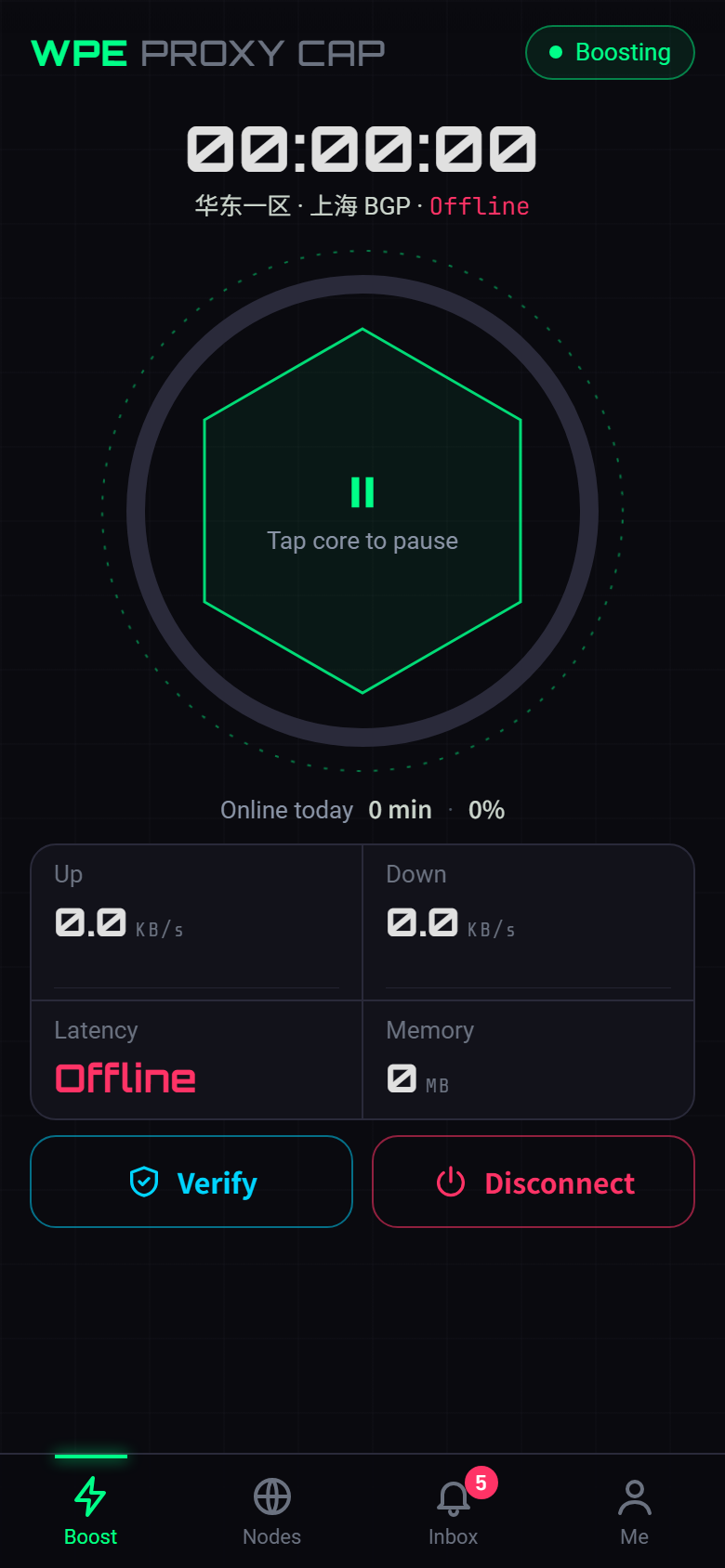
- Timer: this session's time, with the node and latency underneath
- The reactor core: the outer arc is time online today; tap the core to pause or resume the timer — only the timer stops, the proxy is unaffected
- Four readouts: upload / download speed with a sparkline each, latency and memory
- Verify: checks that the proxy is reachable and that your credentials are correct
- Disconnect: asks for confirmation from the bottom; tap Disconnect to confirm
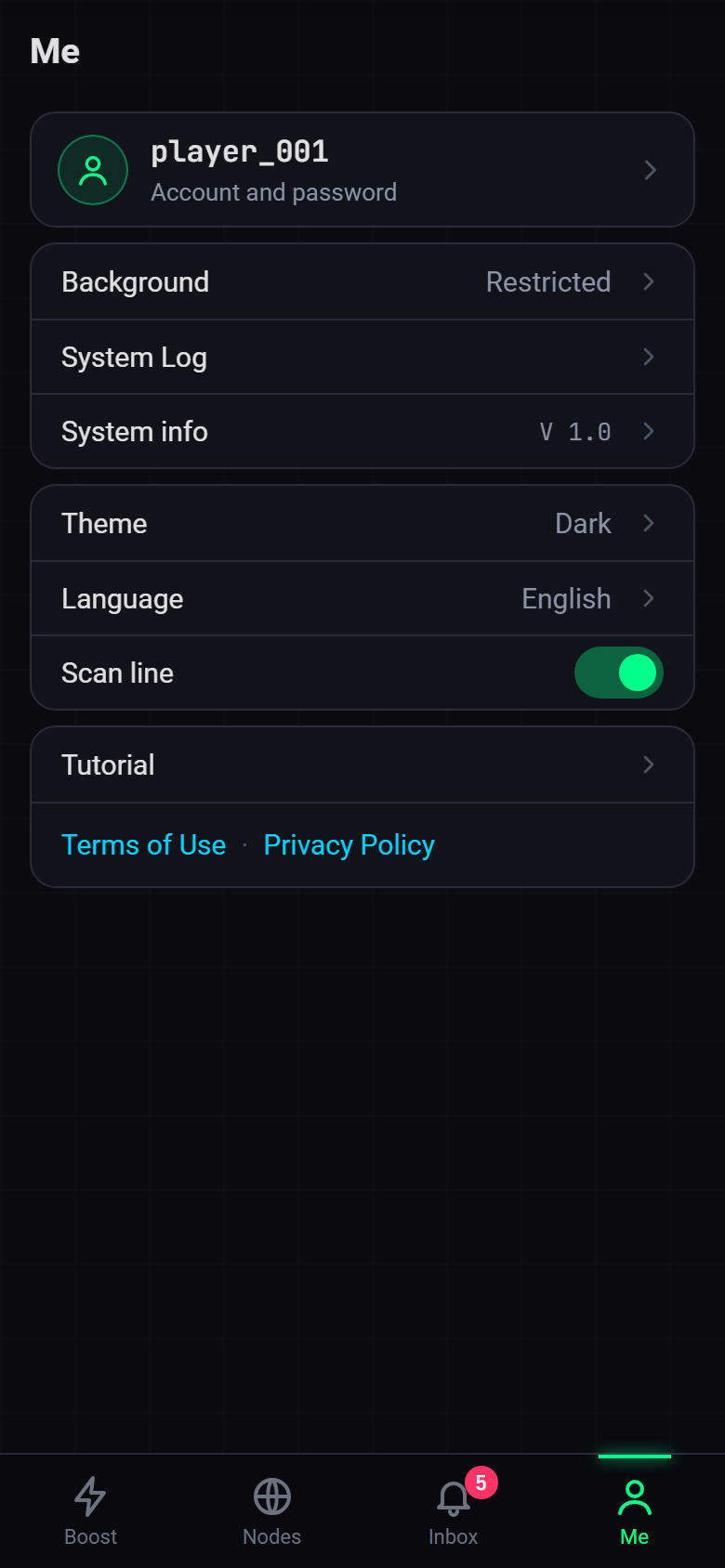
- Account card: tap to change the account, password and Remember me
- First group: background running (only shown when restricted), the System Log (each connection step and the reason for any failure) and System info (a sheet with the app version, core version, OS version, device model and WebView version, which you can long-press to copy)
- Second group: theme (dark / light / system), interface language (seven) and the scan line, applied as soon as you choose — there is no Save step
- Third group: the tutorial, plus the Terms of Use · Privacy Policy links
The security check reads the same way as on Windows — see WPC · the security check.
The Inbox tab puts the notices from the subscription server and the WPE you connect to in a single list, each with a small type tag. Unread ones carry a red dot, and Mark all read clears them in one go; tap a notice to open it, and when it carries a link the detail has a Read more button. Pull down to refresh. Read status is kept on this phone only. On tablets the list and the message sit side by side.
The System Log is under Me → System Log: newest entries at the top, one card per entry with the time, module, level and full message — long-press to copy. The level filter (All / Error / Warning / Info / Debug) only lists the levels present in the log, each with its count and a "N entries" line under the filter; the bar at the bottom holds Check API, Check system and Clear. Log messages are recorded in Chinese.
07 · Rules and DNS
A node's forwarding rules are still pushed from WPC Config in WPE x64. A few points matter on phones:
- Unsupported rules are skipped: a rule the acceleration core does not support does not make the connection fail; it is skipped and written to the System Log. If you are connected but a rule seems to do nothing, look for it in the System Log first.
- PROCESS-NAME / PROCESS-PATH rules are skipped on phones: to route by app, use per-app proxy instead.
- Per-app proxy and node rules are two gates, one after the other: per-app proxy first decides which apps hand their traffic to WPC, then the node rules decide whether that traffic goes through the proxy or direct. Apps you did not select connect directly and no rule reaches them; traffic from a selected app that a rule sends direct does not go through WPE either. With "All apps", the result matches the Windows version.
- Private DNS: with Android's Private DNS turned on, lookups no longer go over the usual port 53, so the app sniffs the domain back out — domains on the common ports (HTTP 80 / 8080–8880, HTTPS and QUIC 443 / 8443) are still recognised and domain-based rules (such as
DOMAIN-SUFFIX) still match. Only traffic on other ports cannot be recovered, so those domain rules may not match; if that happens, turn Private DNS off in the system settings and try again. - DNS answers are IPv4 only: the app answers DNS queries with IPv4 addresses only, so apps on the phone reach WPE over IPv4.
Say a node's rules are just PROCESS-NAME,game.exe,PROXY and MATCH,DIRECT. On a PC that game goes through the proxy; on a phone the first rule is skipped, only "everything else direct" is left, and once connected no traffic reaches WPE. When such a node is selected, a "This node won't proxy any traffic on a phone" banner appears at the top of the Boost tab and the node carries a "No phone proxy rules" tag in the node list; the System Log records it as well when you connect.
Give the node proxy rules written by domain, IP or port, or change the catch-all rule to MATCH,PROXY, then use per-app proxy on the phone to limit it to the game. Rules are edited in WPE x64 under WPC Config.
08 · Troubleshooting
| Symptom | What to check first |
|---|---|
| "VPN permission was not granted" | The VPN connection request on the first connection was refused. Go back to the Boost tab, tap the core again and tap OK on the system prompt |
| The app says WebView is too old | Update "Android System WebView" or "Chrome" from the app store; phones without Google services update it through their own app store |
| "Connection failed. Check your subscription, account and password.", and the System Log says 该账号的设备数已达上限 (device limit reached) | The phone and the PC count as separate devices: disconnect the other device first, or raise the device limit under proxy accounts in WPE x64 |
| Connected, but no internet / an app is not using the proxy | ① Look for skipped rules in the System Log; ② if domain-based rules do not take effect, turn the phone's Private DNS off and try again; ③ in "Only selected apps" mode, unselected apps do not use the proxy, and changes need a reconnect; ④ is the proxy service on the WPE side running? |
| Per-app proxy is missing from the Boost tab while connected | It is only shown while disconnected. Disconnect, change it, then connect again; the Me tab does not have this entry |
| Disconnects after the screen locks or the app goes to the background | Allow background running as in section 05, and allow auto-start / background running in the phone manager app; the reason for the disconnect is in the System Log |
| The app disappeared after pressing Back | It only went to the background and the connection is still up; disconnect from the Boost tab or the notification |
| PROCESS-NAME rules do nothing | These rules are skipped on phones — use per-app proxy instead |
| Connected, but no traffic goes through WPE | The node has no proxy rules that work on a phone (often because its rules only name processes) — see section 07; or the app is not selected in per-app proxy |
Whatever the problem, start with Me → System Log, which you can filter by level. These cases are explained in more detail under FAQ · Proxy Cap · Android. Problems with the subscription ID, the subscription server status or the account are handled the same way as on Windows — see WPC · troubleshooting.